
21 Casino UK Verification & KYC Identity Checks
 Available in GB
21 Casino verifies player age, identity and address. Its official Help Centre says automated checks are made against the details entered at registration to confirm that the customer is at least 18, is the person they claim to be and matches the supplied address. When extra evidence is needed, the operator can request documents rather than relying only on the automated match.
21 Casino lists five main document categories that may be requested: proof of a bank account, an identification document, proof of address, payment-card documentation and proof of e-wallet ownership. These are possible request categories rather than a universal pack for every account. The Help Centre does not state one fixed KYC processing time.
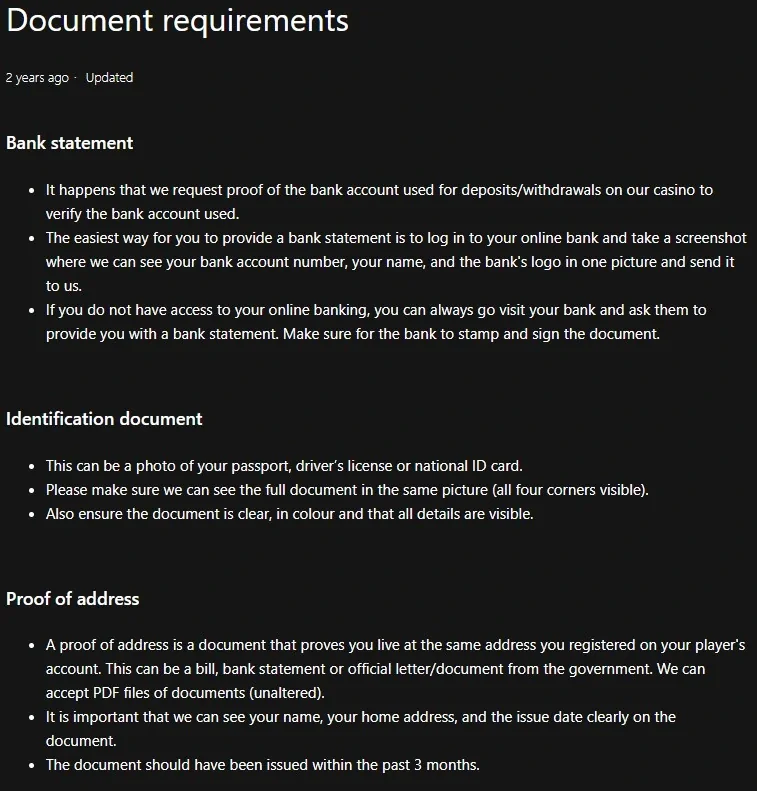
Table of Contents
- UKGC Mandatory Verification at 21 Casino
- The official document categories that may be requested
- Do you need every document on the list?
- How to prepare identity documents
- Proof of address: the three-month rule
- Card verification: hide the sensitive digits the Help Centre tells you to hide
- E-wallet and bank-account ownership
- How to send documents
- How long does 21 Casino verification take?
- KYC is not the same as a financial vulnerability check
- Verification and withdrawals
- A KYC preparation checklist
- Bottom line on 21 Casino verification
- Frequently asked questions
UKGC Mandatory Verification at 21 Casino
The brand’s verification article gives a clear baseline: automated checks compare registration details to confirm age, identity and address. For a Great Britain account, that means the account information is not treated as self-certifying. The operator needs reasonable confidence that the player is an adult and that the identity behind the account matches the supplied details.
At the account-opening stage, registration covers the create-account route, activation and automated account checks. Additional identity or payment documents become relevant only when the account requests them.
The official document categories that may be requested
21 Casino lists document types it may request from a customer. Not every account needs every document listed.
Bank statement
The Help Centre says a bank statement can be requested to verify a bank account used for deposits or withdrawals. For online banking, it says a screen image should show the bank account number, the customer’s name and the bank’s logo in one picture.
Identification document
The listed examples are a passport, driving licence or national ID card. The Help Centre asks for the full document in one picture with all four corners visible, in colour, clear and with all details visible.
Proof of address
The article gives a bill, bank statement or official government letter or document as examples. It says the name, home address and issue date must be visible and that the document should have been issued within the past three months.
Payment card
If a card is requested for verification, the Help Centre asks for front and back images. It instructs customers to show only the first six and last four card-number digits, cover the digits in between and cover the CVC or CVV code. It also asks for the name and expiry date to be visible and for the full card to appear in the picture.
Proof of e-wallet ownership
For an e-wallet used to deposit or withdraw, the article says a screen image can be used to show ownership. It gives Skrill, Neteller and PayPal as examples and says the image should show the email address, username and name.
These five categories cover identity, address and ownership of payment routes. A separate source-of-funds request should not be assumed for every account; if an account receives an additional request, the instructions attached to that request determine what is needed.
Do you need every document on the list?
No universal requirement is established by the Help Centre article. It repeatedly describes situations in which 21 Casino asks for a particular item.
An account might be verified through automated checks and never need all five categories. Another account could be asked for one identity document and proof of address. A payment-specific review could require bank, card or e-wallet evidence. Submit only the documents requested in your account or through official support.
Do not upload extra payment data merely because a third-party review says it is “usually required”. Sending more personal information than requested is not a shortcut. Follow the actual verification request and the current Help Centre instructions.
How to prepare identity documents
For identity evidence, the Help Centre currently gives three examples: passport, driving licence and national ID card. Its presentation requirements are practical and specific. The document should be shown in full, all four corners should be visible, the image should be in colour and the details should be clear.
Proof of address: the three-month rule
The official article says proof of address can be a bill, a bank statement or an official government letter or document. It also says the customer’s name, home address and the issue date must be clearly visible. The document should have been issued within the past three months.
The Help Centre says unaltered PDF files can be accepted for proof-of-address documents. If you are using a PDF statement, keep it in its original form rather than editing out sections that the operator has not asked you to remove.
Card verification: hide the sensitive digits the Help Centre tells you to hide
Payment-card evidence deserves extra care because it contains information that should not all be visible. The current Help Centre guidance asks for the first six and last four digits of the card number to remain visible while the digits between them are covered. It also says the CVC or CVV security code on the back should be covered.
The article still asks for enough information to link the card to the account holder: the name and expiry date should be visible, the back should be signed, and the full card should appear in the picture. Follow the current request rather than sending an uncensored card image.
If your payment question is about a cashout rather than document formatting, move to the withdrawals. Verification can intersect with withdrawals, but that does not mean every withdrawal has the same document requirement or delay.
E-wallet and bank-account ownership
For e-wallet ownership, 21 Casino can ask the customer to show the wallet account used for a deposit or withdrawal. The Help Centre describes an account screen image that shows ownership details such as the email address, username and name, with Skrill, Neteller and PayPal given as examples.
For bank accounts, a bank statement can be used to show ownership of the account used for deposits or withdrawals. For online banking, the Help Centre describes a saved account image showing the account number, customer name and bank logo in one view. If online banking is unavailable, it describes a bank-provided statement that is stamped and signed.
How to send documents
21 Casino provides a document-upload route for customers who receive an account request. Using the upload route attached to the casino account keeps identity and payment documents within the intended account process rather than sending them to contact details copied from elsewhere.
The operator’s Great Britain status and domain relationship are covered separately in the licence and operator. Verification security starts with making sure you are dealing with the correct operator.
How long does 21 Casino verification take?
The Help Centre does not state one fixed KYC processing time. Identity and document pages explain what can be requested and how documents should be presented, but the time required can depend on the account and the documents involved.
KYC is not the same as a financial vulnerability check
Identity KYC asks who the customer is and whether account details can be verified. Great Britain’s light-touch financial vulnerability checks are a different regulatory control based on specified publicly available financial-risk indicators. The Gambling Commission explicitly says those checks are separate from financial risk assessments.
Verification and withdrawals
Verification can affect a withdrawal when the operator needs to confirm identity or ownership of the payment route before releasing funds, but it is inaccurate to say every cashout will automatically trigger all KYC documents. The account’s existing verification status and the specific payment method matter.
For the practical cashout sequence and the point at which account documents can affect a pending request, see the 21 Casino withdrawals guide.
A KYC preparation checklist
- Use the 21 Casino account and its document-upload route.
- Submit only the document category that has actually been requested.
- Make sure names and addresses match the account details.
- For photo ID, keep the full document visible and the image clear and in colour.
- For proof of address, use a document issued within the past three months and make sure name, address and date are visible.
- For card evidence, expose only the first six and last four number digits and cover the CVC or CVV as the Help Centre instructs.
- For e-wallet evidence, show the ownership information requested without sharing passwords.
- Do not edit documents to change factual details.
- Do not rely on a fixed processing-time promise that the official pages do not make.
This checklist is designed to help you satisfy a legitimate request, not to bypass one. If an account decision becomes a dispute rather than a simple document issue, the site’s complaint routes explains the separate escalation context.
The broader 21 Casino brings this topic together with the casino’s other main account and product areas.
Bottom line on 21 Casino verification
21 Casino describes automated account checks and five document categories that can be requested: bank-account documentation, identity documents, proof of address, payment-card documentation and proof of e-wallet ownership. It also sets presentation and redaction requirements for several of those categories.
The key is not to turn that list into a universal upload pack. Follow the request made to your account, use the official upload route, protect sensitive card information in the way the Help Centre instructs and do not rely on an invented approval timetable.
Frequently asked questions
What ID can 21 Casino ask for?
The official Help Centre lists a passport, driving licence or national ID card as identification-document examples. It asks for the full document in one picture, in colour and with all details visible.
How recent must proof of address be?
The Help Centre says the proof-of-address document should have been issued within the past three months and should clearly show the customer’s name, home address and issue date.
Should I show my full card number and CVV?
No. The official guidance says to show only the first six and last four card-number digits, cover the intervening digits and cover the CVC or CVV code on the back.
How long does KYC take?
No fixed processing time is stated for every account, so completion can depend on the documents requested and the circumstances of the account.
Published by the 21 Casino Casino team.